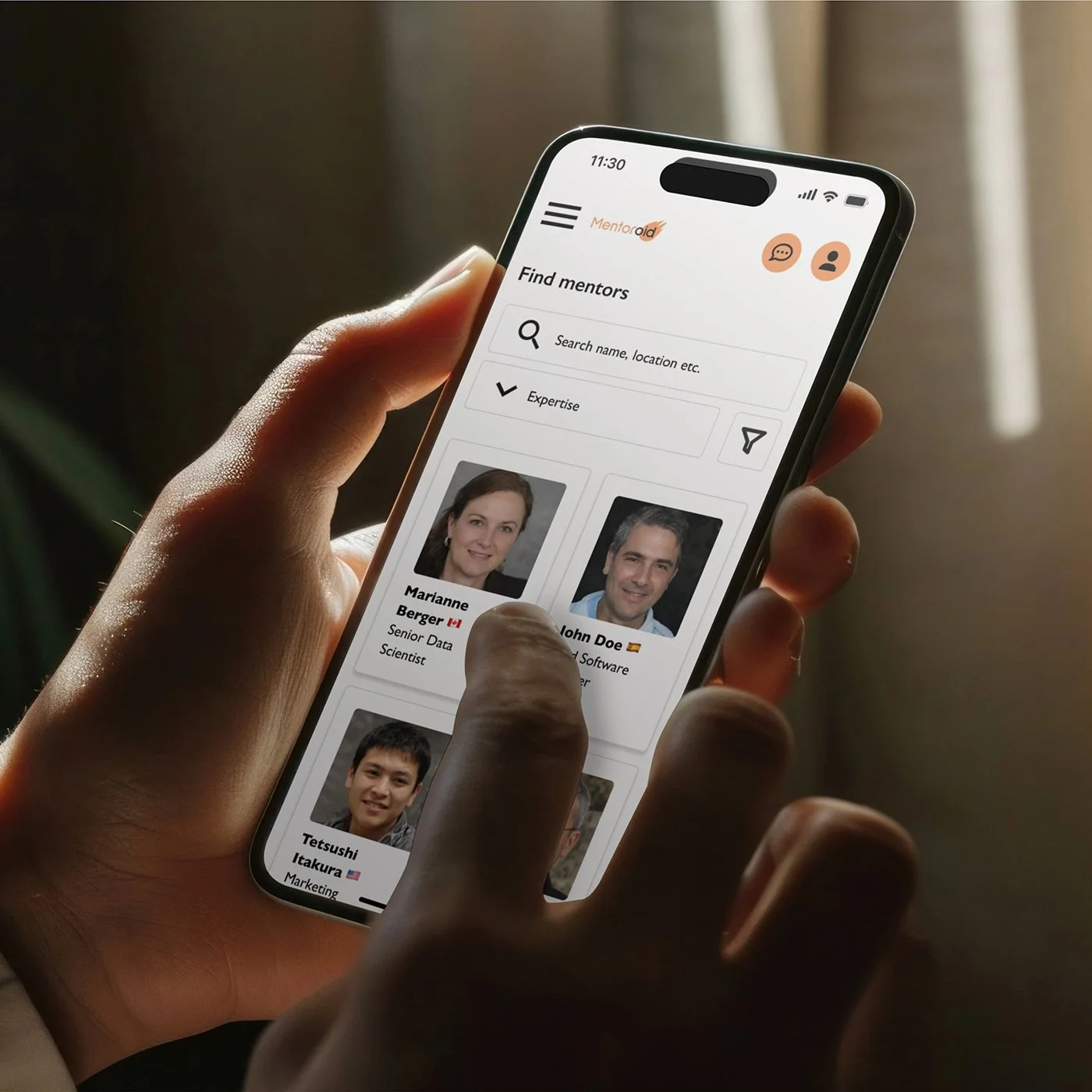
Mentoring platform for easy mentor discovery and booking
UX DESIGN / UI DESIGN / UX RESEARCH
Overview
Mentoring can help people advance in their careers and improve their skills. Existing mentoring platforms are either hard to navigate, mostly have gated content or lack integrated scheduling and communication tools. As my final portfolio project for the Google UX Design course, I decided to design a mentoring platform for a website and app that tackles these issues.
The platform is designed for people who are new graduates, will graduate soon or are making a career change. With the website and app, users can find mentors in their own fields or areas of interest, schedule meetings with them, and communicate with them via messaging or video calls. The platform also offers users valuable information regarding job hunting and skill development.
Timeline: Winter 2025
Role: Sole UX designer (research, UI and UX writing)
Responsibilities: user research, wireframing, prototyping, user testing, UX writing
Tools: Figma, Photoshop, Google Forms, ChatGPT
Survey about mentoring needs
I started the project by conducting a survey about people's mentoring needs. There were 18 respondents to the survey, which mapped people's current career challenges, past mentoring experiences, mentorship preferences, and wishes regarding an online mentoring platform.
Survey results
Over 70% between 26 and 35 years of age
Over 70% career switchers
Less than 30% had a mentor before
Only some participants had prior mentoring experience, suggesting the mentoring platform needed to be easy to use and access
Most respondents said they would like a mentor to provide guidance on their career paths and job-hunting, for example.
In-person meetings, one-on-one video calls, chat-based communication, and email exchanges were the most preferred mentoring formats. The main topics that people would like to discuss with a mentor are career advice, skill development, resume or portfolio review, interview preparation, and networking.
Most people would find mentor-mentee matching, chat integration, and a resource library, such as articles and templates, useful features in a mentoring app.
Empathising with the users
Based on the survey results, I created two user personas: one of a recent graduate and one of a career switcher.
I continued empathising with the users by creating user journey maps, problem statements and goal statements. This helped me to figure out how my mentoring platform could help its potential users.
The user personas and the user stories helped prioritise easy mentor matching and scheduling over long onboarding flows and complex registration processes.
Competitive audit
After doing user research, I researched some possible competitors. For the competitive audit, I chose three mentoring platforms, a coaching platform and an AI-driven mentoring app.
The competitive audit helped me discover useful features for the website and app. Having good filtering options and categories on the mentor listing page, as well as reviews on the mentor page, and having an integrated video call tool were some of these.
Unlike some competitors, I wanted to keep the gated content to a minimum to make the platform accessible and welcoming.
Creating user flows and sitemap
To begin ideating the mentoring platform, I created storyboards and made user flows that show the two main paths users take while using the platform. I limited the user flows to booking and document sharing, to keep the MVP focused on the most common tasks.
I also created a sitemap to establish a hierarchy for the platform and to map out all its pages.
Ideating on paper wireframes
After I had planned the structure of the platform, I started to sketch wireframes on paper. To design the main screens of the platform, I focused on the pages that were most important for the main user flows: the home page, mentor listing page, mentor and mentee profile pages, and scheduling.
First digital wireframes
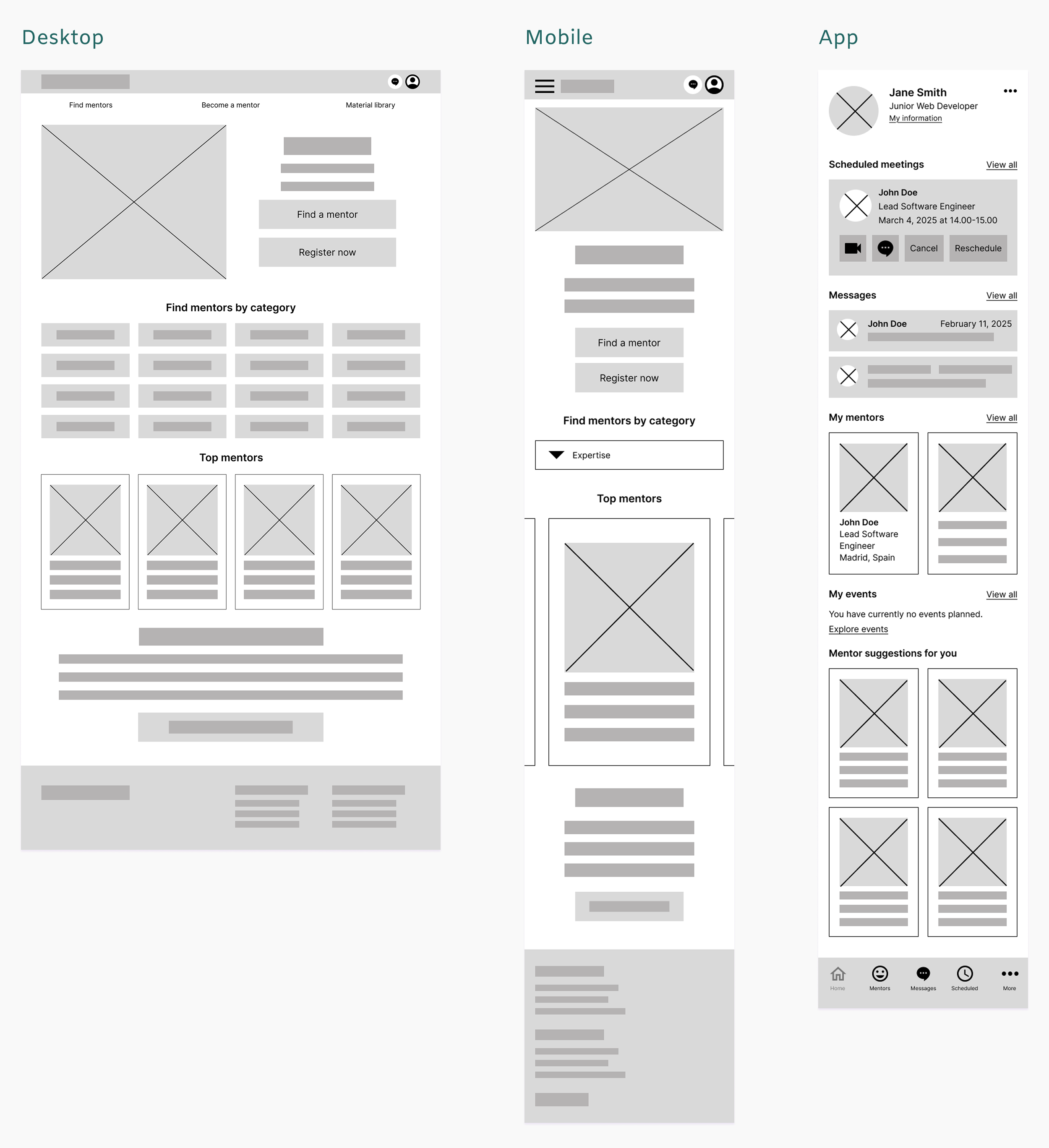
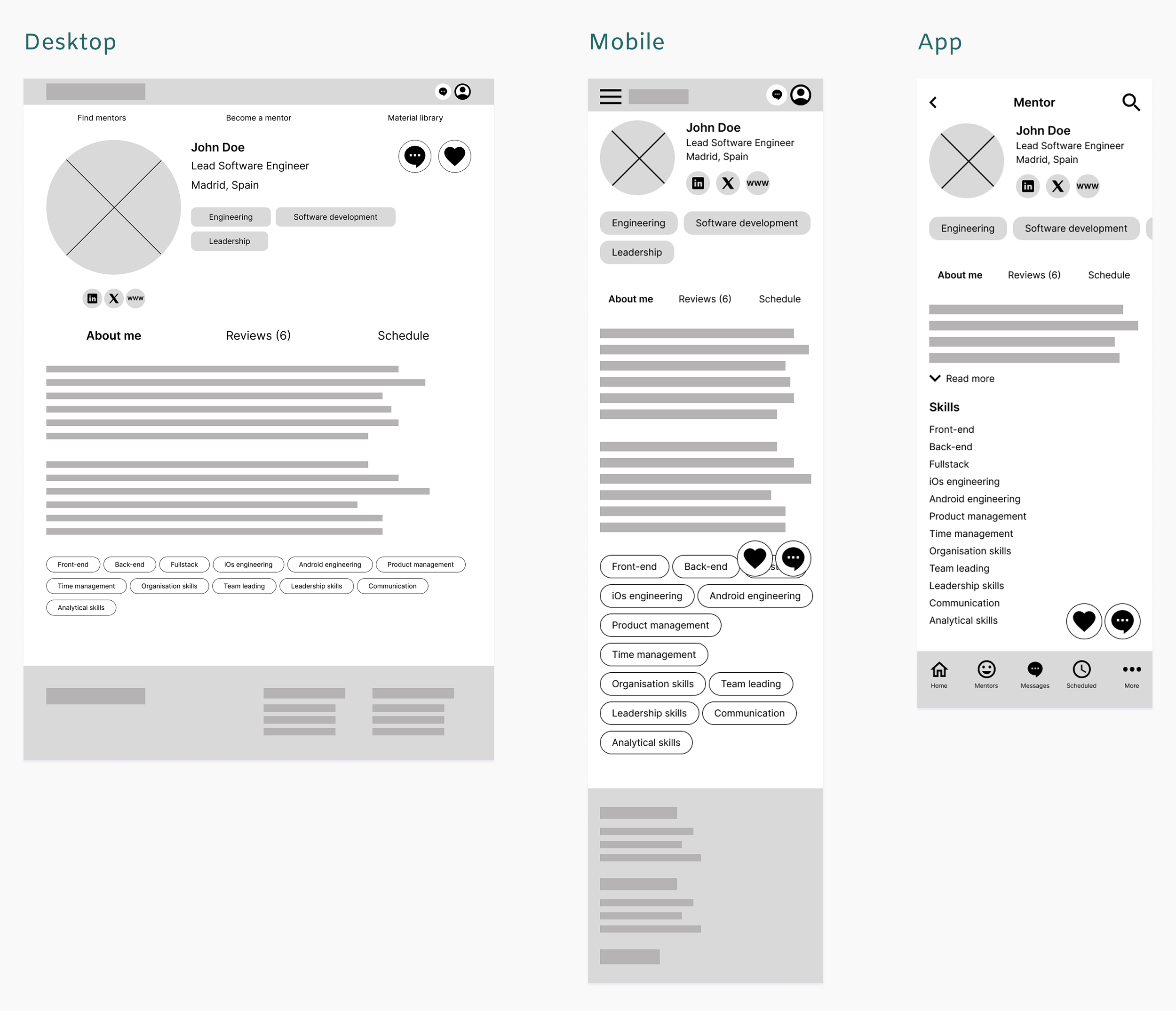
After sketching some ideas on paper, I started to create low-fidelity digital wireframes in Figma.
Homepage
Since app users are already familiar with the product, the dashboard serves as the app’s home screen.
Mentor profile page
The navigation is tailored to each device to reflect different usage contexts and interaction patterns.
First usability study and iterations
After completing the wireframes for two main user flows, I conducted the first usability study to test my prototypes.
In the first usability study, I had six participants who represented the user group. Study participants tested the platform's two main user flows: scheduling a meeting with a mentor and starting a video call with the mentor. I realized I had to tweak the scheduling flow and make some of the buttons more clear after reviewing the study results.
Study results
Users struggled to locate scheduling because it was under the fold, leading to missed task completion.
The booking confirmation was missing, which made users feel unsure if the booking was completed.
Based on the feedback and in order to improve the user experience, I removed the 'Schedule' tab from the mentor profile page and added a 'Schedule' button instead, which opens an overlay with scheduling options on click. On the desktop version, the button is above the fold, and on the mobile version, the button is floating at the bottom of the screen.
Besides making the scheduling tool more clear, I added a booking confirmation message and changed some of the buttons' visual style.
High-fidelity prototype
After the first usability study, I started creating the high-fidelity prototype. I decided on the colour palette and style for the visual elements. To make the design more coherent, I created UI components while working on my prototype. I also made some alterations to the layout, as I wanted to include more white space in my design.
Homepage
Dropdown menus and a limited number of buttons on mobile and app to reduce cognitive overload.
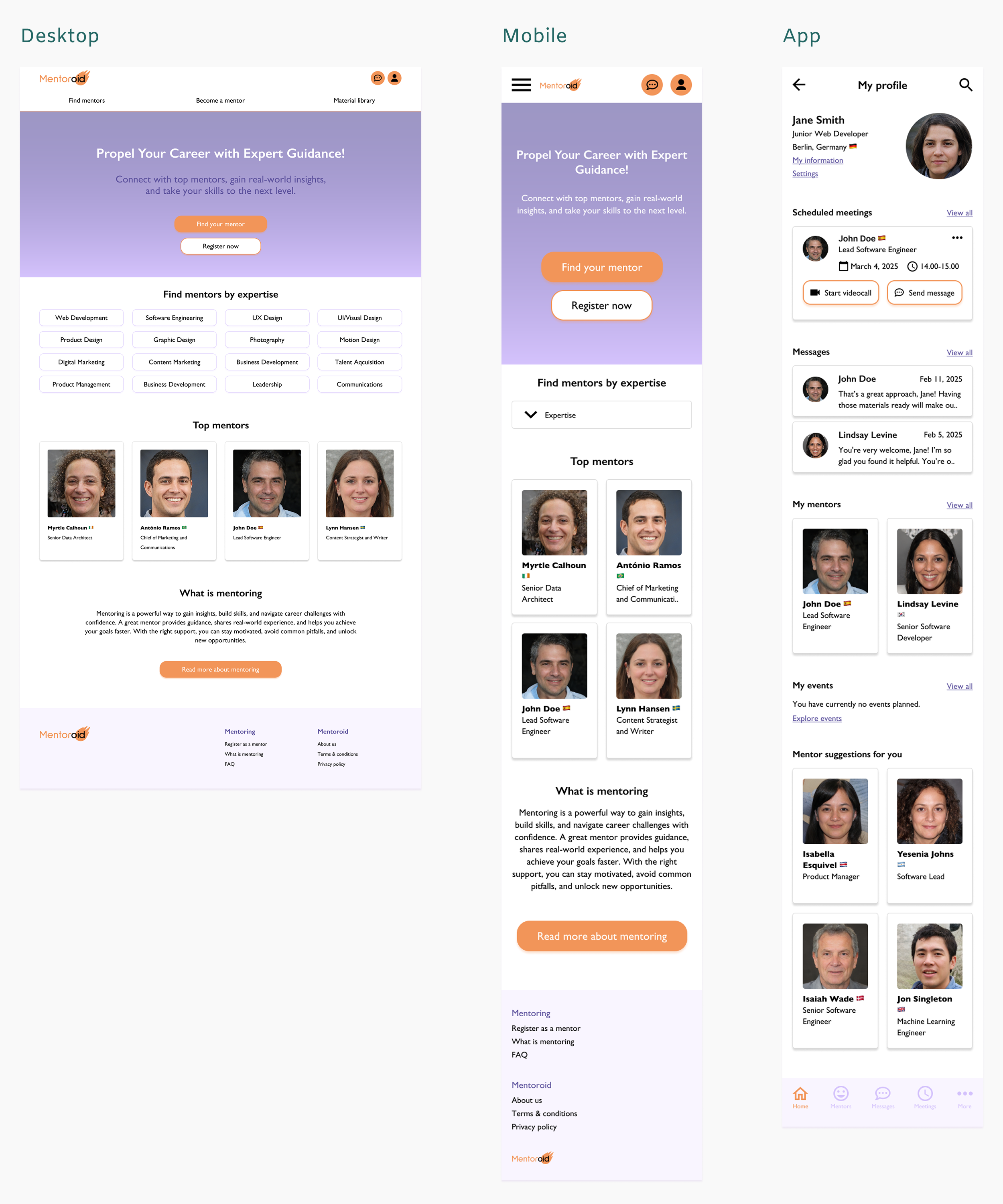
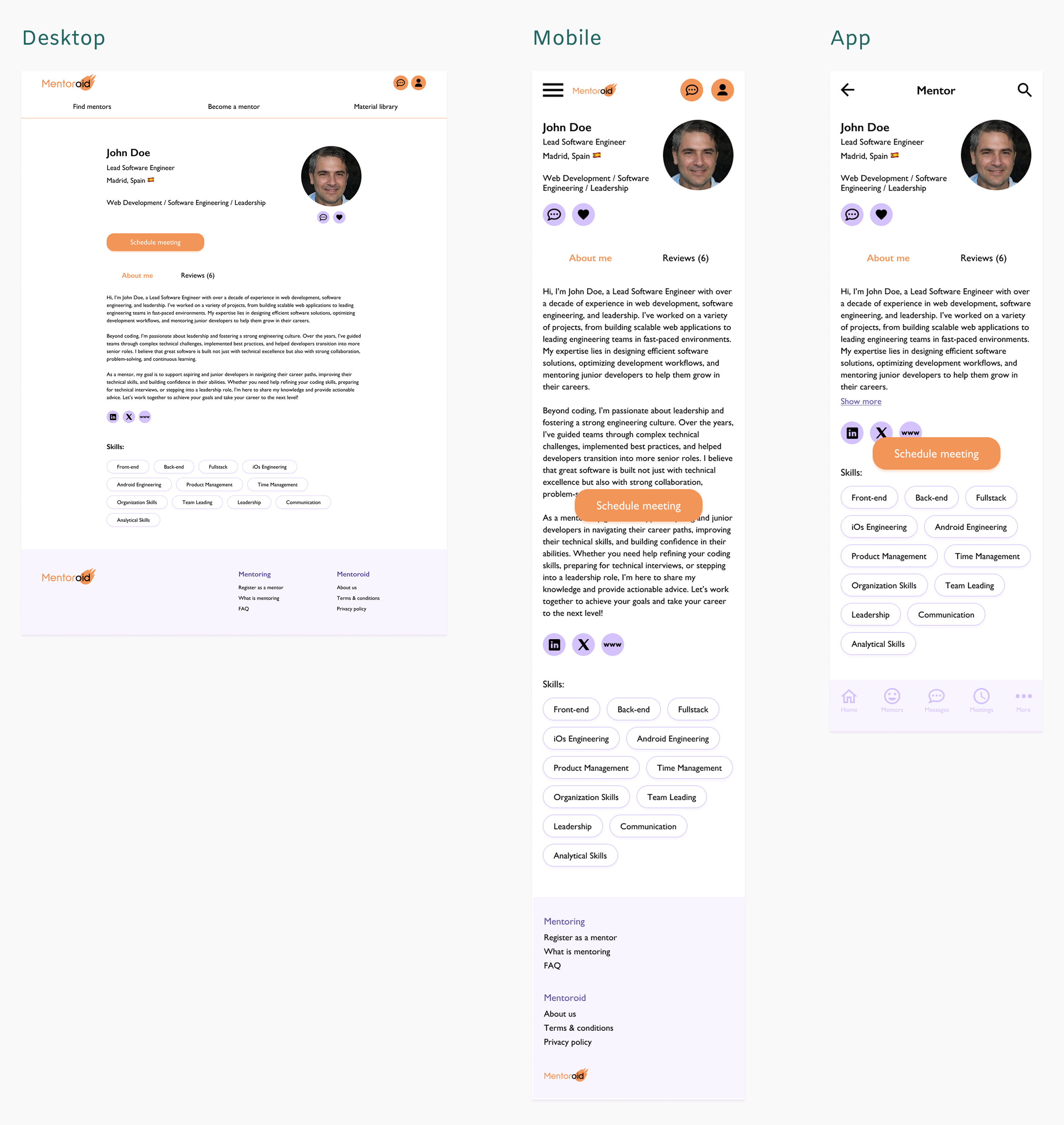
Mentor profile page
The floating scheduling button on mobile and the app makes the scheduling tool visible and easy to find.
Second usability study and iterations
I conducted the project's second usability study after finishing the high-fidelity prototype. The second usability study involved seven people from the platform's user group. The participants tested the same two primary user flows as in the first usability study: scheduling a meeting with a mentor and starting a video call with the mentor.
According to the second usability study, both the website and the app were easy to use, and all participants completed both tasks without difficulty. Feedback from the study was positive, and based on the results, I needed to make only a few minor changes.
Study results
Because of the colour choices, the app’s bottom menu wasn’t easy to read and navigate.
After receiving a booking confirmation, users were looking for easy access to view their scheduled meetings.
I changed the icon colours to enhance the contrast in the app's bottom navigation. Additionally, I increased the size of the font. On the booking confirmation screen of the mobile website and app, I added a link to the scheduled meetings.
After ending the video call, some participants were confused that they were taken to the mentor's and mentee's conversation screen instead of the screen where they started the video call. That's why I changed this interaction to take the user back to the previous screen, where the call had started.
Design system and
UI components
I wanted the mentoring platform look uplifting and youthful but professional. Purple colour symbolises wisdom and ambition, and orange colour is energetic and happy. A legible sans-serif font enhances accessibility and usability.
While I was working on the high-fidelity prototype, I created a library of UI components that I was using throughout the product.
Reusable components improved consistency across desktop and mobile layouts.
Foundations
Core UI components
Navigation components
Feature-specific components
Using AI to boost productivity
I used AI tools like ChatGPT and thispersonnotexist.org for brainstorming, content creation and resolving technical issues during prototyping. With AI assistance, I was able to swiftly address issues and maintain a steady workflow, leading to quicker iterations and a more polished final product.
Mockups
Desktop website
Mobile website
Mobile app
The mentoring platform
Conclusion
The biggest challenges in this project were figuring out how to integrate the scheduling tool on the platform, coming up with a nice mobile layout, and finding a good structure for the mentee dashboard. There was a lot of information, icons, and buttons that fit nicely on the desktop version, but on the mobile site, the layout started to look crowded. Nevertheless, I'm happy with the outcome. The mentoring platform has a consistent, clean and fresh look across desktop and mobile devices.
This project reinforced the importance of mobile-first thinking for feature-dense platforms, which I would apply earlier in future projects.
While working on the low-fidelity wireframes, I decided to redesign the app's UI, as my initial plan for the layout didn't work that well on mobile. After the redesign, it was easier to implement the same layout for the mobile website.
Next steps
For this project, I only designed the main user flows of the mentoring platform. To complete the platform, the last pages should be designed. These include, for example, the material library section, log-in, FAQ and mentoring info pages.